How Long Should a Product Demo Video Be? Lengths by Channel
How long a product demo video should be for landing pages, App Store, Google Play, LinkedIn, X, Shorts, Reels, Product Hunt and sales, with the data and platform limits behind each number.
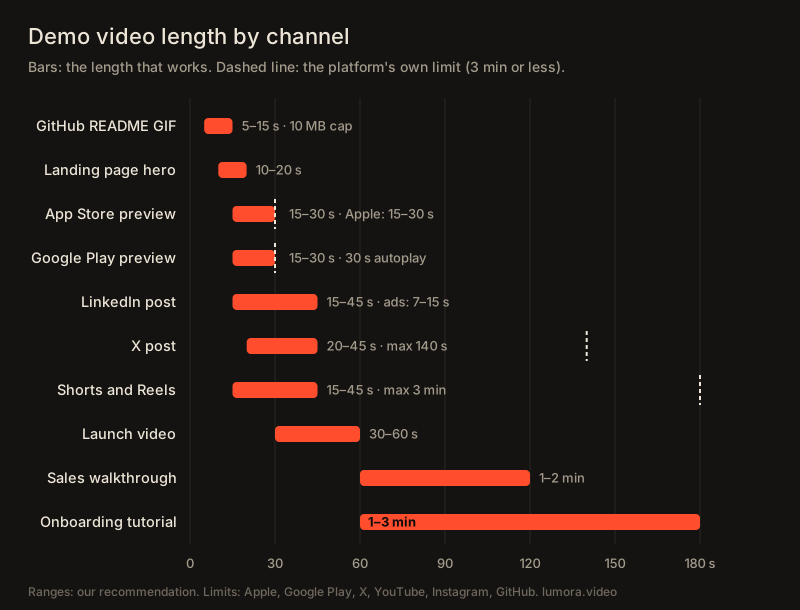
A product demo video should be 15 to 60 seconds for marketing (launch posts, social feeds, landing pages), one to two minutes for a sales or website walkthrough, and one to three minutes for onboarding, where the viewer already wants the detail. Store videos have their own rules: Apple's App Store previews must be 15 to 30 seconds, and Google Play only autoplays the first 30. Shorter almost always wins, because viewers drop off with every extra second.
Below are the numbers for each channel, with a link to where each one came from.
What does the data say about video length?
Two large datasets agree: the shorter the video, the larger the share of people who watch to the end.
- Vidyard, in its 2025 Video in Business Benchmark Report (more than 940,000 videos made by its customers in 2024): "If a video is under 1 minute long, 65% of viewers stay engaged all the way to the end." For videos over 20 minutes, only 20% do. The report also says engagement drops at every length milestone and is highest in the first quarter of a video.
- Wistia reports that videos under a minute average a 52% engagement rate, meaning viewers watch about half of them on average.
- LinkedIn says, for video ads, that 7–15 second videos see up to a 300% lift in completion rates, and that attention drops after the first 10 seconds.
None of this means long videos fail. It means each extra second has to earn its place. A two-minute walkthrough works for someone comparing tools on your pricing page. It doesn't work in a feed, where the viewer didn't ask for it.
How long should a demo video be on each channel?
| Channel | Length that works | Platform limit or rule | Source |
|---|---|---|---|
| GitHub README GIF | 5–15 s | Images and GIFs up to 10 MB | GitHub Docs |
| Landing page hero loop | 10–20 s | None, but it must loop cleanly | — |
| App Store app preview | 15–30 s | Must be 15–30 s; up to three previews per device size and language | App Store Connect Help |
| Google Play preview | 15–30 s | No maximum, but only the first 30 s autoplay (muted) | Play Console Help |
| LinkedIn post | 15–45 s | Video ads: 3 s to 30 min | LinkedIn ad specs |
| X post | 20–45 s | 140 s for regular accounts on the web | X Help Center |
| YouTube Shorts | 15–45 s | Up to 3 minutes | YouTube Help |
| Instagram Reels | 15–45 s | Up to 3 minutes since January 2025 | Social Media Today |
| Product Hunt launch video | 30–60 s | No length guidance; YouTube links only | Product Hunt Help |
| Sales or website walkthrough | 1–2 min | — | — |
| Onboarding tutorial | 1–3 min | — | — |
The "length that works" column is our recommendation, built from the engagement data above and from what fits each channel's format. The limits are the platforms' own.
Landing page hero: 10 to 20 seconds
A hero video plays muted, on loop, while people read your headline. Nobody watches it from the start, so it shouldn't need a start. Show one action and its result, and make the last frame match the first so the loop doesn't jump.
If it runs longer than five seconds, give people a way to pause it. That's a WCAG requirement for moving content, covered with the rest of the technical setup in our landing page hero video guide.
App Store and Google Play: 15 to 30 seconds
Apple is strict: app previews must be between 15 and 30 seconds, at most 30 fps and 500 MB. Google Play is looser on paper, but the Play Console Help says only the first 30 seconds autoplay, muted, and recommends showing the app "as early as possible within the first 10 seconds." In practice, both stores want the same thing: 30 seconds or less, product first, no logo intro.
LinkedIn, X, Shorts and Reels: 15 to 45 seconds
Feeds are where length matters most, because the viewer is scrolling past. Three rules:
- Show the product in the first three seconds. LinkedIn tells advertisers to "establish your point in the first 5 seconds".
- Make it work muted. LinkedIn's advice is to "think like a silent film director" and consider burned-in subtitles.
- Ignore the maximums. Shorts and Reels can run three minutes and X allows 140 seconds, but a demo that needs that long belongs on YouTube or your site.
Export a vertical (9:16) cut for Shorts and Reels instead of posting a landscape video with bars. Sizes are in our demo video specs cheat sheet.
Launch videos: 30 to 60 seconds
A launch video (Product Hunt, a launch tweet, the top of a press page) has to tell a whole story: the problem, two or three moments in the product, the result and a call to action. That takes 30 to 60 seconds. Product Hunt doesn't limit the length, but the video has to be a YouTube link. More in how to make a Product Hunt launch video.
Sales walkthroughs and onboarding: one to three minutes
Here the viewer already cares. A prospect who clicked "watch the demo" on your pricing page, or a new user in their first session, wants to see how things actually work. One to two minutes covers a sales walkthrough; onboarding tutorials can run to three. Past that, split it into chapters or separate videos, one task each.
How many words fit in a demo video?
VirtualSpeech puts a comfortable presentation pace at 100 to 150 words per minute. For a demo, where viewers also need to look at the screen, stay at the slower end:
| Video length | Narration that fits |
|---|---|
| 15 s | 25–35 words |
| 30 s | 50–75 words |
| 60 s | 100–150 words |
| 2 min | 200–300 words |
If the script doesn't fit, cut a feature. Don't speed up the voice or the footage.
How do you make a demo video shorter?
- Cut the logo intro. Start on the product. Your name goes on the end card.
- One feature per video. Three short clips beat one long tour, and each can be posted on its own.
- Remove waiting. Loading screens, typing and form filling can be cut or sped up. Or skip the recording and make the demo from screenshots, so there is no waiting to cut.
- Let the camera do the explaining. A zoom into the button says "click here" faster than a sentence does. See camera moves for UI videos.
In Lumora (our tool) you set the length first and the camera, callouts and music fit themselves to it, so the same edit can be cut to 15 seconds for a feed and 30 for a store.
FAQ
How long should a product demo video be?
For marketing (a launch, a social post, a landing page), 15 to 60 seconds. For a sales or website walkthrough, one to two minutes. For onboarding, one to three minutes. Vidyard's 2025 benchmark found that 65% of viewers finish videos under a minute.
How long can an App Store preview video be?
Apple requires app previews to be between 15 and 30 seconds. You can upload up to three per device size and language.
How long should a Google Play preview video be?
Google Play sets no maximum, but only the first 30 seconds autoplay, muted. Google recommends showing the app within the first 10 seconds.
How long should a LinkedIn product video be?
15 to 45 seconds for an organic post. For ads, LinkedIn reports that 7 to 15 second videos see up to a 300% lift in completion rates, and recommends showing the key message in the first 10 seconds.
How many words fit in a 30-second demo video?
About 50 to 75 words of narration at a comfortable 100 to 150 words per minute. Leave a second or two of silence at the start and end.