Product Demo Video Script Template (with Word Counts per Length)
A fill-in-the-blanks product demo video script template for 30, 60 and 90 second videos, with word counts per section, a worked example and a downloadable text file.
A product demo video script has five parts: a hook that states the outcome, the problem, two or three moments in the product, the result and a call to action. At a comfortable 100 to 150 words per minute, a 30-second video holds 50 to 75 words and a 60-second video 100 to 150. Write one sentence per screen, read it aloud with a timer, and cut until it fits without rushing.
Below is the template with word counts for 30, 60 and 90 seconds, a filled-in example, and a plain-text version to download.
How many words fit in a demo video?
VirtualSpeech puts a comfortable presentation pace at 100 to 150 words per minute. A demo is a presentation where viewers also need to watch the screen, so plan at the slow end and let the visuals carry the rest.
| Video length | Total words | Hook | Problem | Product moments | Result | Call to action |
|---|---|---|---|---|---|---|
| 30 s | 50–75 | 8–10 | 8–12 | 25–40 (3 × 8–13) | 6–8 | 4–6 |
| 60 s | 100–150 | 10–15 | 15–20 | 55–85 (3 × 18–28) | 10–15 | 6–10 |
| 90 s | 150–225 | 12–18 | 20–30 | 90–135 (4 × 22–34) | 15–25 | 8–12 |
The split is our rule of thumb: about half the words go to the product itself, and the hook and call to action stay short whatever the length. How long the video should be in the first place depends on where it plays; see how long a demo video should be.
The script template
Copy this, replace the brackets, and keep one line per screen.
VIDEO: [product], [length] seconds, for [channel]
VIEWER: [who] who wants to [job they're trying to get done]

1. HOOK  (0–3 s)
   VO / text: [The outcome, in under 10 words.]
   Screen:    [The result screen, at its best.]

2. PROBLEM  (3–8 s)
   VO / text: [What's slow, risky or annoying today, in their words.]
   Screen:    [The old way, or a still of the messy state.]

3. MOMENT 1  (8–14 s)
   VO / text: [Action + benefit: "Drop in X and Y happens."]
   Screen:    [The screen where it happens.]  Callout: [3–6 words]

4. MOMENT 2  (14–20 s)
   VO / text: [Next action + benefit.]
   Screen:    [...]  Callout: [3–6 words]

5. MOMENT 3  (20–25 s)
   VO / text: [Next action + benefit.]
   Screen:    [...]  Callout: [3–6 words]

6. RESULT  (25–28 s)
   VO / text: [The outcome again, now earned. A number if you have a real one.]
   Screen:    [Finished state.]

7. CALL TO ACTION  (28–30 s)
   VO / text: [One action. "Try it free at example.com."]
   Screen:    [Logo, one line, URL.]
The times are for a 30-second cut. For 60 seconds, roughly double each section; for 90, add a fourth moment rather than stretching the three.
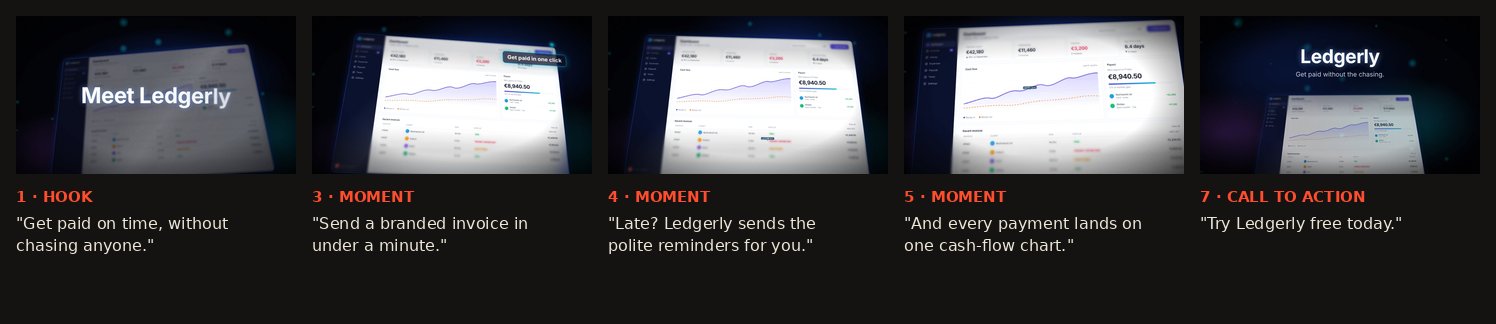
A filled-in example (30 seconds, 52 words)
For a sample invoicing app, Ledgerly:
| # | Voiceover / on-screen text | Words | Screen |
|---|---|---|---|
| 1 Hook | Get paid on time, without chasing anyone. | 7 | Dashboard, cash flow going up |
| 2 Problem | Late invoices mean awkward emails and a cash flow you can't plan. | 12 | Overdue list, red badges |
| 3 Moment | Send a branded invoice in under a minute. | 8 | Invoice editor · callout "Get paid in one click" |
| 4 Moment | Late? Ledgerly sends the polite reminders for you. | 8 | Reminders · callout "Late? Reminders go out" |
| 5 Moment | And every payment lands on one cash-flow chart. | 8 | Chart · callout "Cash flow at a glance" |
| 6 Result | Less chasing. More paid invoices. | 5 | Paid list, all green |
| 7 CTA | Try Ledgerly free today. | 4 | Logo and URL |
| Total | 52 |
That's 52 words for 30 seconds, at the low end of the 50 to 75 range, which leaves breathing room for the music and the cuts. (Ledgerly is one of Lumora's sample templates, not a real company.)
Rules for writing each part
Hook (first three seconds). Lead with the outcome, not your name. "Get paid on time" beats "Introducing Ledgerly". Show the best screen while you say it.
Problem. Use the words your users use when they complain. Keep it to one sentence; people already know their problem, you're only showing that you know it too.
Product moments. One action and one benefit per sentence: "Drop in a screenshot and the camera starts moving." Name what the feature does, not what it's called. Three moments is the sweet spot for 30 to 60 seconds; a fourth only at 90.
Result. Restate the outcome now that the viewer has seen how it happens. Only use a number if it's real and you can back it up.
Call to action. One action, one URL. "Try it free" or "Join the waitlist", never both.
Read it aloud, then cut
Read the script out loud with a timer, at the pace you'd actually speak. If it runs long:
- Cut the weakest product moment.
- Shorten the problem to one clause.
- Merge result and call to action.
Don't solve it by speaking faster or speeding up the footage. A rushed voice is the first thing viewers notice.
Voiceover, captions or on-screen text?
Many viewers watch with the sound off; LinkedIn tells advertisers to "think like a silent film director". So write the script so it works as text first:
- Feeds (LinkedIn, X, Shorts, Reels): on-screen text and burned-in captions; the voice is a bonus.
- Landing page hero: no voice at all, the hero loop plays muted.
- Product Hunt, YouTube, sales: voiceover plus captions.
If you record your own voice, record in a quiet, soft-furnished room, close to the microphone, and do three takes of each line.
From script to video in Lumora
In Lumora (ours), paste the script into the voiceover field and it becomes captions timed to the video, in pop, clean or karaoke style. Callouts take the 3–6 word lines from the template, and the camera moves between the screens you listed. If you'd rather start from the visuals, the screenshots guide covers capturing the screens the script calls for.
FAQ
How many words is a 30-second product demo script?
About 50 to 75 words. That's a comfortable 100 to 150 words per minute, which leaves room for the viewer to look at the screen. For a 60-second script, 100 to 150 words.
What should a product demo video script include?
Five parts: a hook (the outcome in one line), the problem, two or three moments in the product that solve it, the result, and a call to action. Each product moment gets one sentence and one screen.
Should I write the script before or after recording?
Before. Write the script, list the screen for each line, then capture exactly those screens. Recording first usually means narrating whatever happened to be on screen.
Do I need a voiceover at all?
No. Many demo videos are watched muted, so the same script can become on-screen text and captions instead. Write it as if no one will hear it, then decide whether to record a voice.
How do I make a script sound natural?
Read it aloud with a timer. Cut any sentence you stumble on, use 'you' more than 'we', and replace feature names with what the feature does for the viewer.